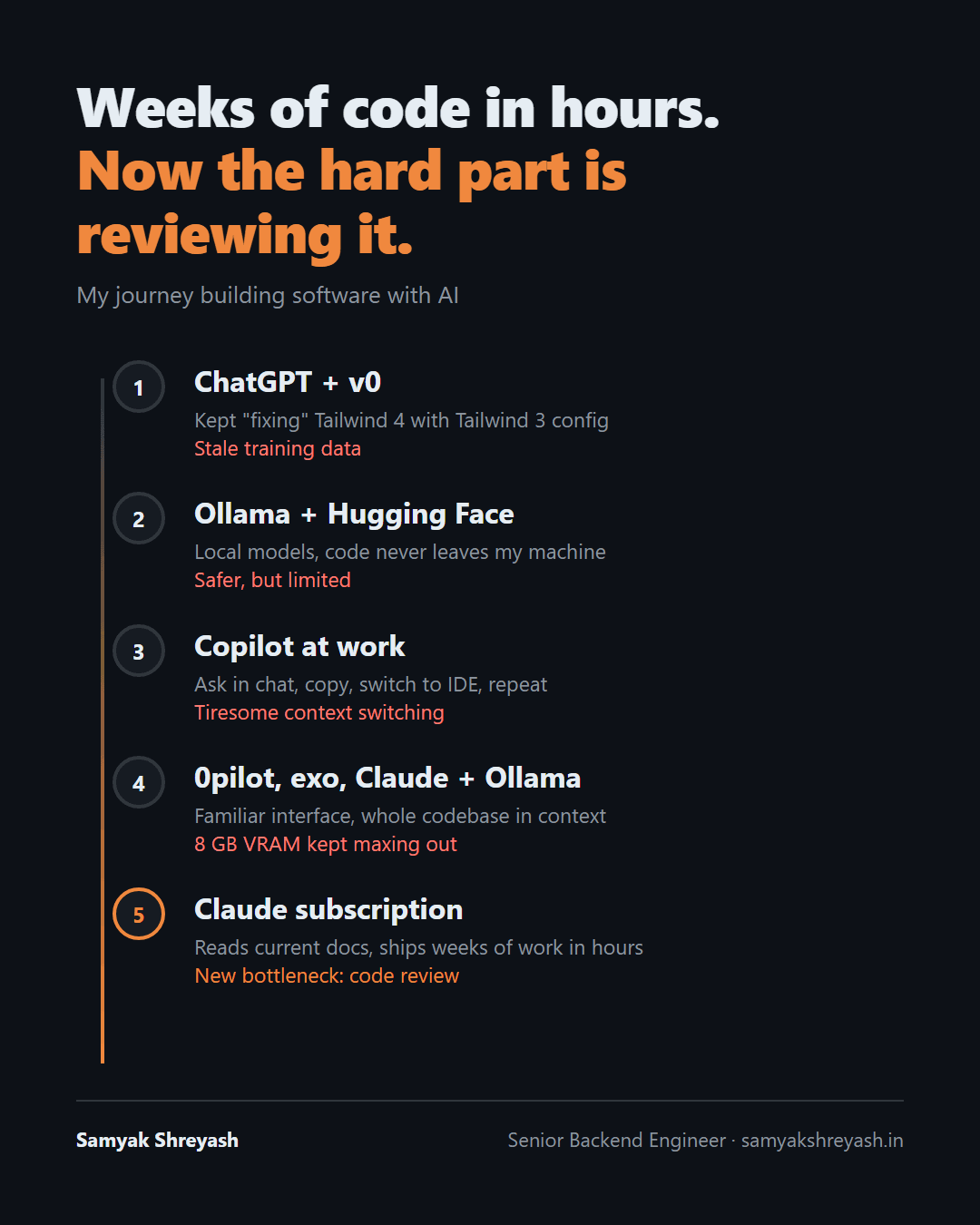
5 Stages of Coding with AI, and the Bottleneck Nobody Warned Me About
In [late 2024], v0 and ChatGPT kept trying to "fix" my Tailwind CSS 4 project by adding a tailwind.config.js and the old @tailwind directives. That's how Tailwind 3 worked. Version 4 had dropped both.
Every fix made things worse, because neither tool knew v4 existed.
That moment was the first stage of how I build software with AI. Two years and five stages later, the tools write code faster than I ever could, and the hard part of my day has moved somewhere I didn't expect.
Stage 1: ChatGPT and v0, frozen in time
My first AI-built apps were a loop: prompt ChatGPT or v0, copy the code, deploy to Vercel, paste the error back, repeat. For small projects it felt like a superpower.
The catch was the training cutoff. These models had no web access and only knew the world as of their last training run. Anything newer came out as a confident guess.
Tailwind 4 was the clearest example. This is what the AI kept giving me:
/* Tailwind 3 style, what the AI suggested */
@tailwind base;
@tailwind components;
@tailwind utilities;
And this is what Tailwind 4 actually wanted:
/* Tailwind 4: one import, theme lives in CSS */
@import "tailwindcss";

@theme {
  --color-brand: #f0883e;
}
The AI wasn't wrong about Tailwind. It was wrong about which Tailwind, and it had no way of knowing.
Lesson: a model only knows what it was trained on. When the docs change, its answers don't.
Stage 2: Ollama and Hugging Face, local and safe
Next I moved to running models on my own machine with Ollama, and tried new ones from Hugging Face most weekends. My code never left my laptop, there were no API bills, and I finally understood things like quantization and context windows from actually hitting their limits.
Local models felt safe. They were also small, and small models are confidently creative. I once watched one write a careful unit test for a function that didn't exist anywhere in my codebase.
Lesson: privacy and cost are real wins, but a small model needs a short leash.
Stage 3: Copilot at the office, the chat-window tax
At work, Copilot became part of my daily routine, and I grew dependent on it faster than I'd like to admit. The model was fine. The workflow was the problem:
- Ask a question in a chat window
- Copy the answer
- Switch to the IDE
- Wire it into the code by hand
- Find what it didn't know about the rest of the project
Do that dozens of times a day and it wears you down. The AI only ever saw the snippet I pasted, never the system it had to fit into.
Lesson: an assistant that can't see your codebase hands you snippets, not solutions.
Stage 4: 0pilot, exo and Claude with Ollama, everything in context
Then came tools that worked inside a familiar interface. 0pilot was slow, but because it felt like the editor I already knew, the work finally flowed. exo let me experiment with running models across my own devices.
The bigger jump was pairing Claude-style agentic tooling with local models through Ollama. For the first time, the whole codebase was in context instead of one pasted snippet. The AI could read the file it was changing, the files that called it, and the tests around it.
Then I hit the wall: 8 GB of VRAM. On anything bigger than a demo project, the context kept maxing out. The idea was right, but the hardware couldn't keep up.
Lesson: context is everything, and context costs memory.
Stage 5: a Claude subscription, weeks of code in hours
With a Claude subscription, both problems went away. The context is large enough for real projects, and the model reads current documentation instead of guessing from old training data.
That second part fixes the Stage 1 problem directly. When I set up authentication recently, I pointed Claude at the Spring Security 7 reference. It wrote the config in the current style, with no deprecated adapter class and nothing from 2021 to clean up:
@Bean
SecurityFilterChain securityFilterChain(HttpSecurity http) throws Exception {
    http
        .authorizeHttpRequests(auth -> auth
            .requestMatchers("/public/**").permitAll()
            .anyRequest().authenticated())
        .oauth2ResourceServer(oauth2 -> oauth2.jwt(Customizer.withDefaults()));
    return http.build();
}
I still keep local models around for cheap, repetitive work like writing tests and making small fixes, while Claude handles planning, debugging and feature code. Each does what it's good at.
The result: work that used to take weeks now gets written in hours.
The bottleneck nobody warned me about
Here's the part I didn't see coming. The bottleneck moved from writing code to reviewing it.
I used to spend my day writing code. Now I spend it reading code I didn't type. That's harder than it sounds: AI-written code is fluent, well formatted and plausible, which makes it easy to skim and easy to trust. And every line still goes out under my name.
After 7+ years building backend systems in fintech and healthcare, where a bad deploy can mean failed payments or wrong patient data, I've learned not to trust code just because it looks clean. So these are the habits I'm building now:
- Give the AI today's docs. Point it at the current reference for any library that changes fast. Old training data produces old code.
- Ask for less code. Prefer the smallest change that works and reuse what's already in the codebase. Every line the AI doesn't write is a line I don't have to review.
- Make it prove the change. Tests first, then the fix. A green test I've read is worth more than a diff I skimmed.
- Review the risky parts by hand. Auth, money, data deletion and concurrency get line-by-line attention, no matter who wrote them.
- Keep diffs small. A 2,000-line change can't really be reviewed, only skimmed. Ask for it in pieces.
Where this leaves me
The tools went from guessing to reading, from snippets to whole codebases, and from my laptop's 8 GB of VRAM to the cloud. Each stage removed one bottleneck and revealed the next.
Right now the skill that matters most isn't prompting or picking the right model. It's reading fast and trusting slowly.
How are you handling the review load of AI-written code? I'd like to hear what's working for you. Get in touch.